Designing the AVA Software
Designing intuitive software experiences that support scientific research.
Timeline
Organization
Role
Skills
January - August 2026
UI/UX Designer
Figma, Client Relations
Emulate, Inc.
LONG STORY SHORT..
I led the UI/UX design for AVA’s software experience, collaborating with the product team throughout the process.
Over eight months at Emulate, I designed user-centered software experiences for AVA, a platform that enables scientists to manage and conduct complex cell culture experiments. Working across a multidisciplinary team, I translated complex scientific workflows into intuitive, scalable interfaces. Here are some of my accomplishments:
Design and Research
Designed and researched all UI work for the Workstation and Embedded Software over the course of eight months at Emulate
Design Handoff
Collaborated with developers during implementation to align on interactions, while writing detailed Jira tickets to ensure accurate execution of the intended user experience.
Iterative Work
Generated and presented design concepts in weekly UI meetings, incorporating biologist research and stakeholder feedback.
Single Channel Regulate
THE PROBLEM
One of our clients needed a special type of Regulate Cycle to conduct their experiment
AVA’s existing Regulate Cycle was designed for experiments using fluid flow through both channels. However, the Wyss Institute’s bone marrow experiment required flow only through a single channel, making the existing interface unsuitable for configuring and managing their experiment.
INITIAL ITERATION
My initial idea was to give users the option to choose their own Regulate Cycle.
In my initial design, I gave users the option to choose between the two types of Regulate Cycles. I envisioned that their selection would determine which Regulate Cycle the system automatically ran during the experiment.

Single Channel Regulate vs. Double Channel Regulate?
FEEDBACK
The user should not be able to choose what type of Regulate Cycle they initiate as running the wrong cycle on accident could lead to cell damage. The system should automatically detect based on what media they are using. Thus, there needs to be a way to input media type.
RESEARCH + WHITEBOARDING
I focused on understanding the experimental workflow and uncovering potential risks.
Through whiteboarding the impact of each media type across different flow cycles and interviewing biologists, I learned that selecting the wrong media type could have catastrophic consequences for an experiment. To prevent this, I proposed displaying the selected media type in the top-right corner of the dialog, allowing users to review and edit the media assigned to both the top and bottom channels before running Regulate. From there, we mapped out the proposed user flow to visualize how this new interaction could fit into the existing experience.

Whiteboarding the impact of each media type (Liquid, ALI, Gel) on different cycles.

User flow of proposed design
EARLY FLOW CONFIGURATION CONCEPT
Should flow configuration be explicit in the UI or not?
The discussion took place during a cross-functional design review. The team had two perspectives: some argued that the current design was appropriate because keeping the media selection subtle would reduce the risk of users accidentally changing the default medium/medium configuration to air/gel, which is only used for specialized Single-channel Regulate experiments. Others felt the feature should be more explicit in the UI to highlight this new capability to potential clients beyond the one who originally requested it.


Flow Configuration dialog opens once user clicks the media display on the top right
REACHING A CONSENSUS
The final design markets the feature while minimizing risk of users running the wrong Regulate Cycle.
-
Instead of displaying Flow Actions, Prime, Regulate, and Flush, on the left side of the UI, they are now separated into individual tabs. The left panel now houses the Flow Configuration.
-
Users can select “Edit Configuration” to open a popup where they can modify the media type for each channel.
-
If the user changes either channel’s media type from the default Fluid/Fluid configuration to Air or Gel, the popup displays a message indicating that there will be no flow in the respective channel. The corresponding channel is also disabled in the post-regulate flow. This provides clear feedback that the configuration has changed and confirms that the user is intentionally running a single-channel Regulate.

Default Fluid/Fluid media type selected in the Flow Configuration


Air media type selected in the Flow Configuration

DESIGN EVOLUTION
What started as one idea evolved through four rounds of iteration.


First Iteration
Users given the choice to choose their own Regulate Cycle
Second Iteration
Mirrors the CM2 UI to maintain consistency across products
Third Iteration
Media Config. is placed top-right to prevent accidental changes
Final Iteration
Media Config. positioned at the left for visibility
EMBEDDED UI VS. WORKSTATION UI
Designing the Embedded UI
I ran into several challenges while developing the embedded UI. Designed in parallel with the workstation (desktop) UI, the smaller interface had limitations in space, layout, and information density.
Design Consistency
To maintain consistency with the Workstation UI, I had to decide which features to include or leave out.
Readable Type Size
Because the UI is often viewed from a distance, I used the human scale chart to guide type choices.
Accessible Touch
I ensured touch targets were large enough for biologists to interact with while wearing gloves in the lab.
Limited behavior
The embedded UI couldn’t support typed flow rates, so I explored long-pressing to adjust rates faster.


FINAL DESIGNS
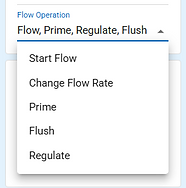
Easily access different experiment operations through the Flow Operation button.


Before
After
Flow Widget Display
Before, the users had to click on a dropdown menu and choose a single operation, making the UI awkward to start flow and change flow rate. The new Flow Widget now has a single Flow Operation button and a media type chip display so biologists know immediately what media is being used in each channel.

Flow Operation Dialogs
The flow configuration is shared across Flow, Prime, Regulate, and Flush. Based on the selected media type, the UI adapts accordingly, allowing the system to determine which Regulate Cycle runs instead of requiring users to choose.
FINAL DESIGNS
Easily access different experiment operations through the Flow Operation button.

Embedded UI: Run the Regulate Cycle
All experiment cycles are accessible through the Flow Operation button. Selecting the link button connects the top and bottom channels, allowing users to set the same flow rate for both channels more quickly.

Embedded UI: Change Flow Configuration
To change the flow configuration, users can select Edit Configuration and choose a different media type from the default fluid. The corresponding channel’s flow rate is then automatically disabled.
Adding "Stretch" to Flow Operation Flow
A NEW KIND OF STRETCH
The AVA uses a different kind of stretch than the Zoe (CM2 model), so the UI also had to accomodate this new kind of stretch the engineers ad biologists were developing.
Previously, the Zoe CM2 used a traditional form of stretch that horizontally stretches the chips using a vacuum, simulating the mechanical forces experienced by organs such as the lungs. AVA did not previously support stretch, but the upcoming transmembrane stretch feature uses a different mechanism: pressurizing the cell membrane to stretch it upward into the top channel. Since this introduced a new capability to AVA, it also required a new UI.

Regular Stretch
The cell membrane is stretched horizontally with vaccum channels.
.png)
Transmembrane Stretch
New Stretch where cell membrane is pressureized into the top channel.
RESEARCH
Before designing for Stretch, I needed to understand how it worked.
I started by talking to an engineer who worked closely with Stretch Chips. I identified the Stretch parameters and maximum limits for each organ type, while gaining a clearer understanding of what Stretch is designed to achieve and how biologists use it in their experiments.

DESIGN ITERATIONS
I needed to determine how users would input and view the new Stretch parameters.
Initially, I explored different ways to display the Stretch parameters in the Flow Widget. I designed this alongside the embedded UI, focusing on consistency between the two screens while ensuring the parameters were easy to understand and accessible on the embedded interface. I also explored different icon concepts to represent the new transmembrane stretch feature.


MAIN PROBLEM
The debate came down to technical logic vs. user expectations.
The team had a long-running discussion about whether Flow and Stretch should live in separate tabs. From an engineering perspective, separating them made sense: Flow and Stretch are technically distinct operations, and Stretch can technically be performed without Flow being active. However, the Design and Product teams believed that keeping Stretch within the Flow experience would better match how users think about and perform these operations.

💡Design Preferred:
Stretch Parameter UI inside the Flow tab

⚙️Engineering Preferred:
Stretch Parameters in a separate tab
ANOTHER ROUND OF RESEARCH
I decided to take a step back and return to our users.
With strong perspectives on both sides, I decided to take a step back from the debate and return to our users. I conducted another round of interviews with biologists and our field scientists and engineers to understand how they actually think about Stretch and what they expected to see in the UI.
Key Findings:
-
Stretch behaves more like Flow than the other flow operations. Unlike Prime, Regulate, and Flush, Stretch does not occur as part of a defined cycle. Instead, it can be turned on or off based on the user’s needs, similar to Flow.
-
Flow is a frequent, continuous interaction while Stretch is not. Biologists start and pause Flow multiple times throughout the day, while Stretch is used much less often. Even when working with an organ model capable of stretching, users may only stretch the organ occasionally.
-
Users need flexibility in how Stretch is represented. Our team was split on which unit to use for Stretch. The existing Zoe system uses Hz, while the team leaned toward seconds/cycle, since Hz alone may not communicate enough context about the stretching motion. The field scientists/engineers were also split on what unit to use, so I determined an automatic unit converter would be helpful.


FINAL DESIGNS
Stretch UI added to the Flow Operation Flow


Embedded Flow Running

Workstation Version
Embedded Paused Flow
Bringing Stretch into the Flow Widget with a more intuitive Flow experience
The Stretch parameters are now displayed directly in the Flow Widget, with the new transmembrane icon lighting up green when Stretch is active. Users can also pause and resume Flow directly from the widget instead of opening the Flow Operation dialog.
Embedded Paused Flow
Workstation Version


Input Stretch Parameters
Stretch parameters are entered within the Flow tab, where they are displayed alongside Flow since Stretch runs concurrently with it. The Period parameter is entered in seconds per cycle and automatically converted to Hz in the Workstation UI for accessibility.
STRETCH UI BEHAVIOR
I used this prototype to communicate to developers how Pause and Resume Flow should behave.

Flow Widget Displays with new Stretch UI
The team had a long-running discussion about whether Flow and Stretch should live in separate tabs. From an engineering.
BIOLOGIST TESTIMONIAL
Thank you to all the biologists who shared their expertise and feedback!
“Being able to link the top and bottom flow rates is really helpful. We typically use the same flow rate for both channels, so being able to adjust them together saves a lot of extra steps.”
“Having all of the Flow Operations in one place makes the interface much more intuitive. Before, it wasn’t obvious where to find things like Flush, Prime, Regulate, or even flow rate adjustments. Now, I can access everything related to Flow from one button."
KEY TAKEAWAYS + LEARNING
This experience sharpened my product thinking and rapid iterating skills!
The importance of grounding design decisions on research
Because the workflows involved complex scientific processes, I had to learn new biological concepts throughout my co-op. I began each project by interviewing biologists and speaking with engineers to understand their workflows and needs. This research gave me a stronger foundation for making informed design decisions later in the process.
Advocating for designs and communicating with PM
There were many meetings where stakeholders from different teams, including biology, product, and software, brought their own perspectives and needs to the table. In these moments, I learned to advocate for the user and communicate my design rationale, while working with the PM to understand product constraints.
Building new components while maintaining consistency with the existing design system
Emulate already had an established design system with a wide range of components. I had to learn not only which components existed in the design system, but also which patterns were commonly used throughout the actual software. This helped me maintain visual consistency when creating new components and icons.

I hope you found something worth exploring.