Ready, set, toggo!
Created time-dependent collaboration features to help groups move into real trip planning.
Timeline
Organization
Role
Skills
January - April 2026
Software Designer
Figma, Figjam
Generate
At Generate, I collaborated with a team of 5 designers, 6 developers, and 1 project lead to build Toggo, a travel planning app that helps groups move beyond endless group chats and into real trip planning.
As a Software designer, I was responsible for researching and designing the app's time-based collaboration features, including "Pitching a Location" and "Voting on a Location." These features encouraged collaborative decision-making by giving users structured ways to propose, discuss, and choose destinations together.
How might we make deciding where to go more collaborative and engaging for everyone in the group?
MARKET RESEARCH
The first step of this process was to research other similar apps out there.
I looked at 6 common trip planning platforms and noted how they balance structure with the organic way groups discuss trips.
6 Competitors
Strengths
Weaknesses
Group editing opportunity
Map features
Customizable UI
Lack collaboration
.png)
Analyzed each companies' value proposition, advantages, disadvantages, and UI/branding approach
Information Overload
Limited personalization
UNDERSTANDING THE USER
I focused on the user flow for Pitching a Location and Voting/Ranking a Location.
As I mapped everything out, I asked myself what each step was: Is it an action or a decision? If it's a decision, is it made by the user or the system? I also thought about where each flow starts and ends, the main path versus alternate paths, and how the visual hierarchy would guide users through the experience.
.png)
I mapped out how users would move through the information in each flow.
.png)
It was important to understand what kinds of users would be using toggo. Although, our target audience is young, each user is different with varying needs.
WIREFRAMING + IDEATION
I explored various ideas to visualize the pitching and ranking flow.
At this stage, I focused on exploring different directions for what this flow could look like. Should pitches be swipeable, similar to the UI commonly found in dating apps? I explored different ways to propose a pitch, such as searching for an existing location and pitching it, or creating one from scratch by manually entering the information. I also thought about ways to make the experience more personal, like allowing users to record a pitch. Finally, I thought about how to make the experience feel more fun by adding some gamification, such as a reveal screen or animation showing the location that received the most votes.

Pitching Flow Ideation

Ranking Flow Ideation
EARLY FLOW
What If Pitching and Ranking Happened at the Same Time?
Because the timer was completely optional, having Pitching and Voting as two separate stages quickly became confusing. In our first concept, the admin could set a timer to start the Pitching stage, and once it ended, manually move the group into Ranking. But this raised a lot of questions: What happens if the admin forgets to end Pitching? Should the app automatically move to Ranking when the timer ends? What happens when there’s no timer at all? Should users be able to see pitches as they come in, or only once Ranking begins?


.png)
Final Design: Parallel Pitching and Ranking
First Iteration: Separate Pitching and Ranking Flows
First iteration of pitching and ranking flows where the admin member has to manually end pitching and start the ranking flow.
I iterated to arrive to a toggle design for "pitches" and "ranking" where "pitches" show all pitched destinations and "ranking" shows the ranking summary.
DEFINING APP FEATURES
I designed these features to make trip planning feel like something the whole group does together

.png)


Set a Destination Timer
To keep the group moving toward a decision, admins can set an optional timer for the pitching and voting process.
.png)

.png)

.png)
Pitching Popup Modals
Pitch a destination by adding media, helpful links, and an audio pitch to give the group a better idea of why they should go.

.png)
.png)
.png)
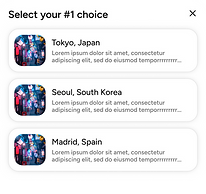
Ranking the pitched destinations
See who voted for each location and update your own rankings by selecting your top three choices.
FINAL DESIGNS
Set a timer, pitch a destination and rank the pitches
Setting a countdown timer
From the home screen, users can select "View pitches," which will lead them to set a countdown timer. This timer is meant to help the group moving forward in the decision-making process and encourage all users to participate by pitching and ranking.
Pitching destinations
To give users more freedom to personalize their pitches, they can add photos from their library, attach helpful or fun links, and even record their own audio explaining why they think their destination should be chosen. Users can also collaborate further by leaving comments on each pitch and sharing their thoughts with the group.
Ranking pitched destinations
To emphasize collaboration, the ranking flow gives everyone a voice in deciding which pitch gets chosen. Each user can select their top three choices and see how others voted through the ranking summary, making it easier for the group to see everyone's preferences.
KEY TAKEAWAYS + LEARNING
I designed these features to make trip planning feel like something the whole group does together
Designing for the unexpected
While designing Pitching and Ranking, I realized how many edge cases can come up when you introduce things like optional timers, admin controls, and different user actions. Thinking through these scenarios helped me design a flow that felt more intuitive and flexible.
Quickly fleshing out ideas into designs
Since we had to design and build the entire app within one semester, I had to get comfortable quickly turning ideas into something tangible, getting feedback, and iterating based off of the feedback. This pushed me to prioritize what needed to be solved now versus what could be refined later.
Explaining my thinking is a part of designing
Because I was working closely with the design lead and developers, I had many opportunities to walk through my flows and explain the reasoning behind my decisions. It made me more intentional about my designs and more comfortable communicating my ideas to people with different perspectives.

I hope you found something worth exploring.